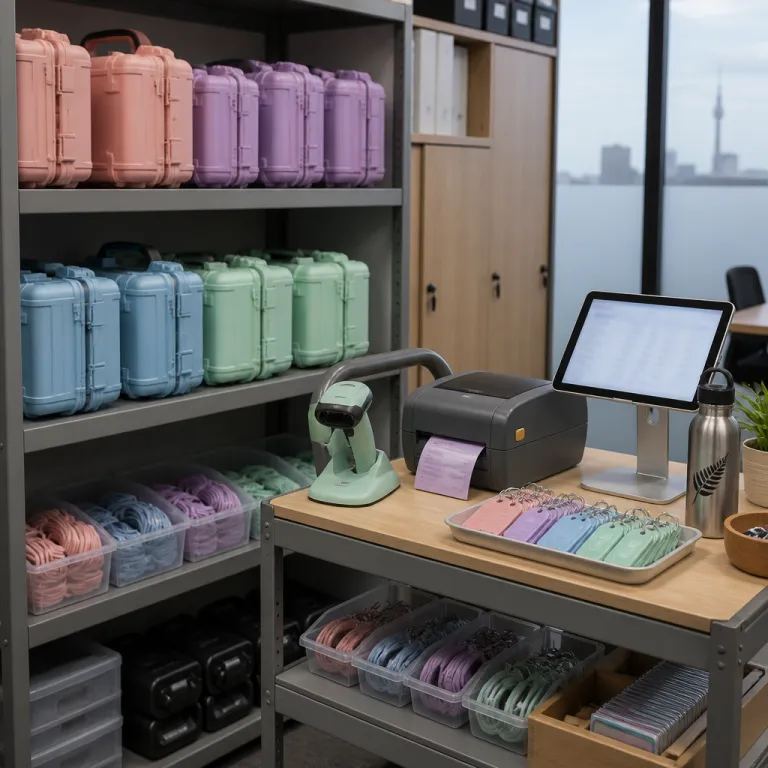
Equipment checkout software for New Zealand offices: from shared scanners to auditable asset tracking
Equipment checkout software for New Zealand offices: from shared scanners to auditable asset tracking
Why New Zealand offices struggle to keep track of shared equipment
Office managers across New Zealand often rely on manual spreadsheets to check equipment in and out. Those sheets look tidy on the meeting room wall, yet they rarely match reality once laptops, projectors, or specialist equipment start circulating between teams. Lost time, missing items, and unplanned purchases quietly erode already tight administration and finance budgets.
In many Wellington and Auckland offices, a single shared scanner or label printer becomes a bottleneck because nobody can check where the item is or who used it last. Without structured tracking, finance teams cannot reconcile asset registers with what actually sits on each table or in each storage room, which undermines depreciation schedules and insurance declarations. Equipment checkout software replaces these ad hoc methods with a centralised system that records every movement, every user, and every return date in a format auditors and insurers can trust.
For New Zealand companies working across multiple floors or satellite offices, the challenge multiplies as equipment sets move between locations for projects or client visits. A cloud based solution lets you select each item from a digital list, assign it to a staff member, and create a clear audit trail that supports both operational control and financial reporting. When staff can quickly check equipment availability from their browser or phone, they stop hoarding devices “just in case”, which reduces unnecessary capital expenditure and improves overall asset tracking in NZ workplaces.
Turning chaotic asset lists into auditable financial records
From an administration and finance perspective, the real value of equipment checkout software lies in how it transforms messy asset lists into structured, auditable records. Each item becomes a digital record with a unique barcode, purchase cost, expected life, and assigned cost centre, which gives your finance team reliable data for forecasting and budgeting. When auditors arrive, you can print a current register, walk the office, and check equipment against the system in minutes instead of days.
Many New Zealand office managers still rely on paper forms to record who borrowed what, which room they used, and when they plan to return it. Those forms are easy to lose, hard to read, and impossible to reconcile with corporate card statements or capital expenditure approvals, especially when staff purchase replacement equipment without telling finance. By integrating equipment checkout software with your corporate card policy controls, and aligning it with guidance such as this corporate card policy for NZ offices, you can link every new purchase to a tracked asset from day one.
Barcode based tracking also reduces disputes between departments about who damaged or lost a particular item, because the system records each handover and return with timestamps. When you set mandatory fields in the checkout form, such as project code or client name, you create a direct bridge between operational use and financial accountability. Over time, this content rich history of equipment usage helps you identify which teams need more devices and which options for shared pools are more cost effective than individual allocations.
Designing a practical checkout workflow for New Zealand office culture
Technology only works when it respects how people actually behave in the office. New Zealand workplaces value trust and autonomy, so equipment checkout software must feel like a helpful solution rather than a surveillance tool. A simple workflow where staff scan a barcode, select their name, and confirm a return date usually strikes the right balance.
Start by mapping the physical journey of each item, from the storage room shelf to the meeting table and back again. Then create a digital workflow that mirrors this path, using clear labels, minimal fields, and logical options that match your existing terminology for teams, projects, and locations. When staff see that the system speeds up their day instead of slowing it, they are far more likely to check equipment properly every time.
Office managers can reinforce good habits by placing a small scanner and a printed quick guide next to each equipment set, such as video conferencing kits or portable testing devices. Short training sessions during team meetings, supported by a concise internal blog post, help the wider community understand why accurate tracking protects budgets and avoids awkward conversations about missing gear. For payroll linked assets like laptops, aligning your asset records with frameworks such as this KiwiSaver checklist for office managers ensures that staff changes, secondments, and departures trigger automatic equipment reviews.
Using equipment checkout data to support smarter financial decisions
Once equipment checkout software is in place, the tracking data becomes a powerful financial tool. You can analyse which items are heavily used, which sit idle in a cupboard, and which rooms or teams generate the most bookings, then adjust purchasing plans accordingly. This evidence based approach helps you defend budgets to senior management and avoid blanket cost cutting that harms productivity.
For example, if the system shows that a particular scanner is booked solid every week while another identical item rarely leaves the storage room, you can relocate assets instead of buying more. When you group items into logical sets, such as training kits or mobile presentation packs, you can evaluate the total cost and utilisation of each set rather than each individual item. Over time, this content rich reporting supports more accurate depreciation schedules and helps finance teams align capital expenditure with actual business demand.
New Zealand companies operating across regions can also compare usage patterns between offices, which highlights where shared community resources or centralised pools might reduce duplication. Linking your asset strategy to broader resilience planning, using resources such as this guide on building a resilient asset maintenance strategy, ensures that equipment checkout software feeds into long term risk management. When you can quickly print a list of critical items and their locations, you are better prepared for audits, insurance reviews, and unexpected disruptions.
Practical configuration choices that matter for New Zealand offices
Selecting and configuring equipment checkout software is not just an IT decision; it is an administration and finance strategy choice. Office managers should work with finance, IT, and health and safety representatives to set clear rules for who can check equipment, how long they can keep it, and what happens when items are overdue. These rules should be reflected directly in the software through permissions, alerts, and required fields.
Look for options that support barcode scanning from mobile devices, because many New Zealand offices operate flexible seating and shared spaces. A simple USB or Bluetooth scanner at the storage room entrance can work well, but mobile scanning lets staff check items at the meeting table or project site without returning to a fixed station. The ability to create custom fields in each item form is also crucial, as it allows you to capture New Zealand specific details such as asset tags, lease terms, or compliance requirements.
Some solutions offer integration with document management systems so you can attach user guides, safety instructions, or maintenance records to each item record. This turns the software into a central content hub where staff can check how to use equipment safely before they leave the room. When evaluating vendors, New Zealand companies should assess local support, data hosting locations, and alignment with privacy obligations, because these factors directly influence long term trust and reliability.
Building a culture of shared responsibility around office equipment
Even the best equipment checkout software fails if staff treat it as optional. Office managers in New Zealand can build a culture of shared responsibility by explaining how accurate tracking protects both the community and individual teams from budget shocks. Clear communication about why finance needs reliable data helps staff see the system as a collective safeguard rather than a burden.
Regular internal updates, whether through a short blog style email or a quick stand up briefing, keep the topic visible without overwhelming people. You might share simple metrics such as the percentage of items returned on time or the reduction in unplanned purchases, which shows tangible benefits from consistent check equipment behaviour. When staff understand that every scanned barcode and completed form contributes to lower costs and fewer disputes, they are more likely to follow the process.
Practical nudges also help, such as placing reminder stickers near the scanner, labelling each room with the correct storage locations, and keeping equipment sets neatly organised on clearly marked shelves. Some New Zealand companies use light hearted internal campaigns to create friendly competition between teams for best tracking performance, which reinforces positive habits without heavy handed enforcement. Over time, this combination of clear process, supportive technology, and transparent communication turns equipment checkout from an administrative chore into a normal part of professional office behaviour.
Key statistics on equipment management and office efficiency
- Global studies from asset management vendors report that organisations misplace between 10% and 20% of portable equipment at least once during its life cycle, which translates into significant write offs and replacement costs for finance teams. For example, a 2022 Zebra Technologies asset tracking report found that nearly one in five surveyed organisations experienced repeated loss of mobile devices (Zebra Technologies, “2022 Asset Tracking Report”).
- Research from the International Facility Management Association indicates that structured asset tracking can reduce time spent searching for equipment by up to 35%, freeing office staff for higher value work. IFMA’s benchmarking studies on facility operations highlight that even simple barcode based check out processes materially cut search time (International Facility Management Association, Operations and Maintenance Benchmarks, 2021).
- Surveys of mid sized companies in Australia and New Zealand have shown that moving from spreadsheet based registers to dedicated asset tracking systems can cut annual unplanned equipment purchases by around 15%, mainly by reducing duplicate buying. A 2021 poll by the Facilities Management Association of New Zealand reported similar savings for offices that adopted cloud asset tracking NZ solutions (Facilities Management Association of New Zealand member survey, 2021).
- Industry benchmarks from software providers suggest that offices using barcode based checkout processes achieve return compliance rates above 95%, compared with less than 70% when relying on informal sign out sheets. Local case studies from New Zealand professional services firms report audit preparation time dropping from several days to less than one day once barcode checkout NZ workflows were introduced (internal case study summaries, 2022–2023).
FAQ about equipment checkout software for New Zealand offices
How does equipment checkout software differ from a simple asset register?
An asset register records what you own, while equipment checkout software records who is using each item, where it is, and when it is due back. The checkout system adds real time tracking, user accountability, and workflow automation on top of the static financial data in your register. For New Zealand offices, combining both tools gives finance accurate valuations and administration teams precise operational control.
Do we need barcode scanners, or can staff use their phones?
Most modern systems support both dedicated barcode scanners and mobile devices, so you can mix options depending on your office layout. A fixed scanner at the storage room works well for high volume items, while phone based scanning suits flexible seating and remote project work. The key is to choose a solution that makes scanning quick and reliable, because ease of use drives staff compliance.
How can equipment checkout data help our finance team?
Checkout data shows actual usage patterns, which helps finance teams align capital expenditure with real demand instead of assumptions. They can see which items or sets justify replacement, which can be shared between offices, and where underused assets tie up capital unnecessarily. This evidence supports more accurate budgeting, depreciation planning, and insurance reviews for New Zealand companies.
Is equipment checkout software suitable for small New Zealand offices?
Even small offices benefit when a few high value items, such as laptops or specialist tools, move between staff regularly. A lightweight cloud solution with simple forms and barcode labels can prevent disputes, reduce loss, and save time compared with manual checklists. The administrative effort is modest, but the financial and operational clarity often grows quickly as the office scales.
What should an office manager look for when selecting a system?
Key criteria include ease of use, barcode support, custom fields, reporting capabilities, and local support that understands New Zealand regulatory expectations. You should also check how the system handles user permissions, audit trails, and integration with existing tools such as finance or HR platforms. A short pilot with one equipment category, such as meeting room technology, is an effective way to test whether the solution fits your culture and workflows, then create a simple internal guide so staff know exactly how to check equipment in and out.
